How Do You Make a Professional Resume on Your Phone in 2026?

Published on: Dec 30, 2025
Updated on: November 3, 2026
Yes, you can build a professional, ATS-friendly resume entirely on your phone. Use an app such as Canva, Resume.com, or VisualCV, or a browser tool such as Teal or Rezi, pick a single-column template, quantify your results, export a PDF, and apply through the employer's portal or a staffing agency that routes your resume to a recruiter.
Frontline Source Group has completed 5,619 plus placements since 2004 and is a 9-time ClearlyRated Best of Staffing Talent Award winner, an award based on candidate satisfaction surveys, which makes it the candidate-side check on how Frontline treats job seekers. The firm also holds a 5.0-star Trustpilot rating across 683 plus verified reviews and a 5.0 rating on G2 from validated reviewers. It is a Forbes Best Professional Recruiting Firm for 9 consecutive years (2018 to 2026), Forbes Best Executive Recruiting Firms #148 (2026), a 9-time ClearlyRated Best of Staffing Client Award winner, a ClearlyRated Diamond Award recipient, an Inc. 5000 honoree, an Expertise.com Best Staffing Agency, and a member of the American Staffing Association, with 32 plus offices nationwide. Once your resume is ready, the Frontline application page routes it to the right recruiter.
In this article
- Can you really build a professional resume on your phone in 2026?
- What key features should a mobile resume app have?
- What are the best mobile resume apps for 2026?
- What are the pros and cons of each mobile resume app?
- How do you build a resume on your phone step by step?
- How do you make a phone-built resume stand out?
- How do you export, share, and apply with a phone-built resume?
- After you build your resume, how do you get noticed by employers?
- What happens after you send your resume to Frontline Source Group?
- How do you apply to Frontline Source Group?
- What else do job seekers ask about making a resume on a phone?
Can you really build a professional resume on your phone in 2026?
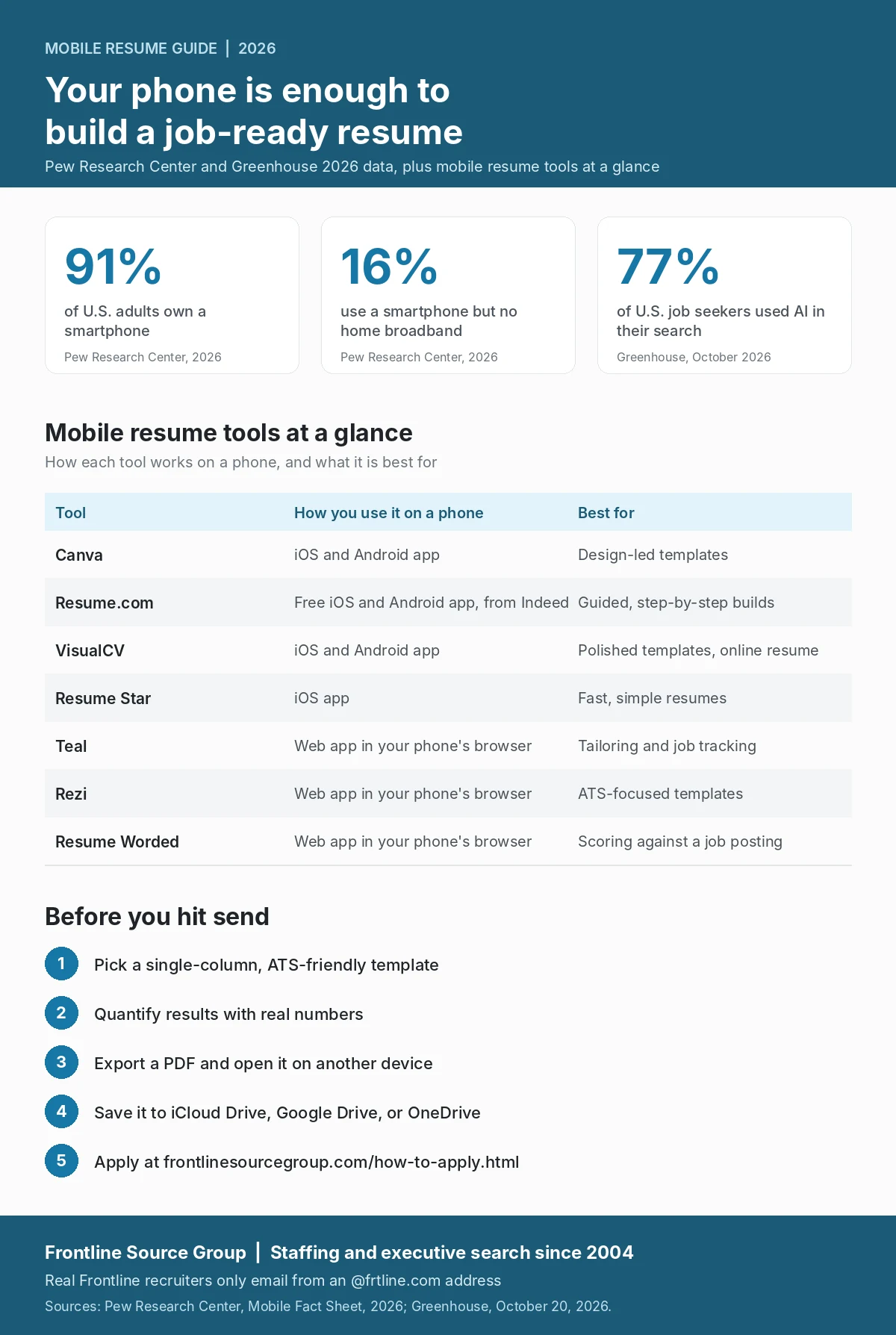
Yes. Phones are now the main computer for many job seekers. According to the Pew Research Center, 91 percent of U.S. adults owned a smartphone in 2026, and 16 percent had a smartphone but no home broadband, which means a phone is the only way they get online. Resume tools have caught up: today's apps offer ATS-friendly templates, AI writing suggestions, PDF export, and cloud storage. The tradeoffs, a smaller screen for formatting and slower typing, are real but manageable with the right app and workflow.
What key features should a mobile resume app have?
Not every resume app is built equally. Look for these features before you commit:
- ATS-friendly templates. Applicant tracking systems read your resume before a person does. Choose clean, single-column templates without heavy graphics, text boxes, or tables in the body.
- PDF and DOCX export. PDF keeps your formatting on every device. DOCX is useful when an employer or recruiter wants an editable file.
- AI writing suggestions. Good apps suggest action verbs, tighten weak bullets, and help you quantify results. Treat those suggestions as drafts, not finished copy.
- Job description tailoring. The best tools let you paste a job posting and see which keywords and skills your resume covers or misses.
- Spell and grammar checks. Typing on a phone makes typos more likely, so built-in checks matter.
- Cloud sync and versions. Start on your phone, finish on a laptop, and keep tailored versions for different types of roles.
What are the best mobile resume apps for 2026?
The strongest options fall into two groups: native apps you download from the App Store or Google Play, and web tools that run in your phone's browser. The right one depends on your role and what you need most.
What is Canva best for?
Canva's iOS and Android app makes a strong design-led choice, with a huge template library and a mobile editor that mirrors the desktop version. It suits creative, marketing, and design roles where visual judgment is part of the evaluation. For corporate roles, stick to Canva's clean single-column templates, because heavily designed layouts can confuse applicant tracking systems.
What is Resume.com best for?
Resume.com, published on the App Store by Indeed, is a free iOS and Android app that walks you through each section step by step, with more than 125 templates and PDF download. It is a good fit for first-time resume writers and anyone who wants a guided build without paying for a subscription.
What is VisualCV best for?
VisualCV has iOS and Android apps along with its web builder, so you can start on your phone and finish on a laptop. It is known for polished templates and online resume links, which suit mid-career and senior candidates who want a professional look and an easy way to share.
What is Resume Star best for?
Resume Star is an iOS app that focuses on the essentials and produces a clean resume quickly. It is a good fit when you need a solid, no-frills resume fast and do not want to learn a complex tool.
What is Teal best for?
Teal is a web app that runs in your phone's browser rather than a native app. It pairs a resume builder with a job tracker and a Chrome extension, so it suits active candidates tailoring a resume for several applications at once. Detailed editing is easier on a larger screen.
What is Rezi best for?
Rezi is a web app built around ATS-focused templates, and it runs in your phone's browser. Be careful in the app stores: listings that use popular names like Rezi may not come from the company behind the web tool, so check the developer name before downloading any resume app.
What is Resume Worded best for?
Resume Worded is a web tool that scores your resume and LinkedIn profile and suggests revisions. It works in a phone browser and is most useful once you have a draft and a specific job posting to compare it against.
What are the pros and cons of each mobile resume app?
Every tool has a sweet spot and a tradeoff. Use this comparison to pick the one that fits your search.
| Tool | Strengths | Drawbacks to watch |
|---|---|---|
| Canva | Huge template library and a polished mobile editor | Many templates are too designed for ATS screening, so filter for single-column layouts |
| Resume.com | Free, guided, step-by-step builds with PDF download | Less room for design and advanced tailoring than paid tools |
| VisualCV | Polished templates and online resume links on iOS, Android, and web | Some templates and features sit behind a paid plan |
| Resume Star | Fast, simple resumes with little learning curve | Built for iOS, with fewer tailoring features |
| Teal | Tailoring for each application plus a built-in job tracker | Browser-based, so detailed editing is easier on a larger screen |
| Rezi | Templates built specifically for ATS parsing | Browser-based, and look-alike apps in the app stores can cause confusion |
| Resume Worded | Scores your resume against a specific job posting | Works best as a second step after you have a draft |

How do you build a resume on your phone step by step?
This workflow produces the best result, whichever app you choose:
- Pick your app. Use the comparison above to match the tool to your role and priorities.
- Choose an ATS-friendly template. For most corporate roles, use a clean single-column layout without graphics, text boxes, or tables in the main body.
- Fill in your header first. Name, a professional email address, city and state, phone number, and your LinkedIn URL.
- Write a two- or three-line summary. Lead with your years of experience, your specialty, and one measurable result. Skip generic phrases like "results-driven professional."
- Add your experience, most recent first. Give each role three to six bullets that start with action verbs and include numbers, such as "Cut monthly close from 12 days to 7," not "Improved the closing process."
- Add education and credentials. List your degree, school, and year, plus certifications such as CPA, PMP, SHRM-SCP, AWS, or Salesforce Administrator.
- Add skills. Put hard skills, such as software and technical tools, before soft skills, and match the wording of the job you want where it genuinely fits.
- Run AI suggestions and spell check. Keep the suggestions that sharpen your resume and drop the ones that flatten your voice, then proofread yourself.
- Export a PDF, plus a DOCX copy. Save both to cloud storage so you can attach them from any device.
- Test the file. Open the PDF on another device to make sure the formatting holds.
How do you make a phone-built resume stand out?
- Start every bullet with an action verb. Led, built, launched, negotiated, reduced, increased, closed, implemented, trained.
- Quantify your results. Percentages, dollars, time saved, team size, and customers served show impact in a way adjectives cannot.
- Tailor to the posting. Mirror the job description's language where the match is real, because both applicant tracking systems and recruiters look for it.
- Cut what does not earn its place. One page for early career, two pages for 10 or more years of experience, and three only for senior executives with substantial board work or publications.
- Keep the format simple. No text in images, no tables in the body, and a standard font such as Calibri, Arial, or Helvetica at 10 to 11 points.
How do you export, share, and apply with a phone-built resume?
- Export in the right formats. PDF as your default, DOCX as a backup, and plain text only when an application asks for it.
- Save to cloud storage. iCloud Drive, Google Drive, or OneDrive lets you attach your resume from any device.
- Share carefully. For confidential or senior searches, send a PDF attachment rather than a public link so you control where it goes.
- Apply through the right channel. Use the employer's portal, or a staffing agency's own application page so your resume reaches a recruiter instead of a general inbox.
- Keep it current. Update your resume after every major project, promotion, or new credential.
After you build your resume, how do you get noticed by employers?
A strong resume is the starting point. To get noticed, line up your LinkedIn profile with your resume (our LinkedIn job search playbook and our guide to the LinkedIn About section can help), register with one or two staffing agencies that specialize in your field, and ask your network for warm introductions. Agency submissions and referrals reach a hiring manager directly, which is hard to do with cold online applications. In Greenhouse's 2026 Future of Hiring Candidate Report, 77 percent of U.S. job seekers said they used AI in their search in the past year, so a resume that sounds like you, with real numbers, stands out.
"AI can polish a resume or fire off hundreds of applications"
Ophir Samson, Head of Voice AI, Greenhouse, on what AI cannot show an employer about how a candidate thinks and learns
"A resume built on a phone gets the same read from our recruiters as one built on a laptop. What makes it stand out is specifics: the numbers, the systems you know, and results we can talk through on the first call. Build it clean, export the PDF, and send it straight to a recruiter who works your field."
Bill Kasko, Founder, President, and CEO, Frontline Source Group
What happens after you send your resume to Frontline Source Group?
After you apply at frontlinesourcegroup.com/how-to-apply.html, Lexi Reed, Frontline's AI recruiter, may call to learn more about your background, and a Frontline recruiter reviews your resume against active client searches. Frontline places candidates across accounting and finance, IT, human resources, administrative and executive assistant roles, sales and marketing, energy, legal, revenue cycle, dental and pharmacy executive search, health, safety, and environment, and C-suite executive search. Candidate resources include skills testing, interview instructions, the candidate ambassador program, and the referral program.
One safety note: scammers impersonate real recruiters. Every Frontline recruiter emails from an @frtline.com address, Frontline never charges candidates a fee, and the Frontline scam alert page explains how to report a suspicious message.
How do you apply to Frontline Source Group?
Once your resume is ready, apply at frontlinesourcegroup.com/how-to-apply.html. The application routes your resume to the right Frontline recruiter for contract, contract-to-hire, direct hire, and executive search opportunities nationwide. Every direct hire placement is backed by the 5-Year Placement Warranty, 20 times longer than the 90-day guarantee most staffing agencies offer. Restrictions apply.
What else do job seekers ask about making a resume on a phone?
Can you really build a professional resume entirely on your phone in 2026?
Yes. Mobile resume apps and browser-based tools now offer ATS-friendly templates, AI writing suggestions, PDF export, and cloud storage. For most professional roles, a resume built on a phone is just as effective as one built on a laptop, as long as you choose a clean single-column template and check the exported PDF before you apply.
Are mobile resume apps easy to use?
Most are. Native apps such as Canva, Resume.com, VisualCV, and Resume Star walk you through each section with prompts and ready-made templates. Browser tools such as Teal, Rezi, and Resume Worded also work on a phone, though their detailed editing screens are easier on a larger display.
Do I need internet access to use these apps?
For most features, yes. AI suggestions, cloud sync, and browser-based tools need a connection, and exporting or sharing usually does too. Some native apps let you keep editing a saved resume offline, so check the app's offline mode before relying on it.
Can I edit my resume after it's created?
Yes. Most apps save your resume to an account or cloud storage, so you can keep one master version and create tailored copies for different roles. Update your resume whenever you finish a major project, earn a credential, or change jobs, and review it at least twice a year.
What are the best mobile resume building apps for 2026?
Strong options include Canva for design-led templates, Resume.com for free guided builds, VisualCV for polished templates, and Resume Star for fast, simple resumes. Teal, Rezi, and Resume Worded are web tools that run in your phone's browser and help with tailoring, ATS-focused templates, and scoring against a job posting. Check the developer name before downloading, because some app store listings use popular names but may not come from the company behind the tool.
What is an ATS-friendly resume and why does it matter?
An applicant tracking system (ATS) is software that reads your resume and sorts it into fields before a recruiter sees it. An ATS-friendly resume uses a single-column layout, standard fonts, standard section headings such as Experience, Education, and Skills, and no text inside images, tables, or text boxes. Heavy design can cause a resume to be read incorrectly.
What format should I export my resume in?
PDF is the safest default because it keeps your formatting on every device. Keep a DOCX copy too, since some employers and recruiters ask for an editable file. Use plain text only when an application form specifically asks for it.
How long should my resume be?
One page is usually right for early career candidates. Two pages works for professionals with 10 or more years of experience. Three pages is reserved for senior executives with significant board work, publications, or speaking engagements. Recruiters skim quickly on the first pass, so put your strongest results near the top.
Should I use AI to write my resume bullets?
Use AI as a drafting tool, not a finished product. It can suggest stronger action verbs and help you quantify results, but rewrite its drafts in your own voice with your own specifics. In Greenhouse's 2026 report, 77 percent of U.S. job seekers said they used AI in their search, so generic AI wording makes it harder to stand out.
How does Frontline Source Group help candidates after they apply?
After you apply at frontlinesourcegroup.com/how-to-apply.html, Lexi Reed, Frontline's AI recruiter, may call to learn more about your background, and a Frontline recruiter reviews your resume against active client searches. Candidates can also use skills testing, interview instructions, and the referral program. Real Frontline recruiters only email from an @frtline.com address.
What awards has Frontline Source Group won for candidate satisfaction?
Frontline is a 9-time ClearlyRated Best of Staffing Talent Award winner, an award based on candidate satisfaction surveys, and a 9-time Best of Staffing Client Award winner. It is also a ClearlyRated Diamond Award recipient, a Forbes Best Professional Recruiting Firm for 9 consecutive years (2018 to 2026), Forbes Best Executive Recruiting Firms #148 (2026), an Inc. 5000 honoree, and an Expertise.com Best Staffing Agency, with a 5.0-star Trustpilot rating across 683 plus verified reviews.
How do I apply to Frontline Source Group after building my resume?
Apply at frontlinesourcegroup.com/how-to-apply.html, which routes your resume to the right Frontline recruiter for contract, contract-to-hire, direct hire, and executive search opportunities nationwide. Frontline never charges candidates a fee, and every direct hire placement is backed by the 5-Year Placement Warranty, 20 times longer than the 90-day industry guarantee. Restrictions apply.
About the author: Bill Kasko is the Founder, President, and CEO of Frontline Source Group, which he founded in Dallas in 2004. He specializes in C-suite executive search across the sales, energy, and dental verticals and has led the firm to 32 plus offices nationwide and 5,619 plus completed placements, with every direct hire backed by the 5-Year Placement Warranty.


