What Are the Best Practices for Virtual Meeting Etiquette?

Published on: Jan 23, 2026
Updated on: November 7, 2026.
Good virtual meeting etiquette comes down to 12 habits in three stages: prepare (a clear agenda, tested technology, a professional setup), participate (camera on when it matters, muted when quiet, clear and inclusive), and follow up with a written summary. Frontline Source Group backs every direct hire with a 5-Year Placement Warranty.
Table of contents
- Why does virtual meeting etiquette matter for remote teams?
- What are the 12 best practices for virtual meeting etiquette?
- How do you prepare for a successful virtual meeting?
- How should you set up your space and technology for a virtual meeting?
- What does professionalism look like in appearance and behavior on video?
- What are the best communication practices in virtual meetings?
- How do you manage distractions and stay engaged during virtual meetings?
- How do you make virtual meetings inclusive and encourage participation?
- How should you handle technical issues during a virtual meeting?
- What is the right way to follow up after a virtual meeting?
- How does Frontline Source Group help candidates and executives prepare for high-stakes virtual meetings?
- Frequently Asked Questions: Virtual Meeting Etiquette
Frontline Source Group has completed 5,619 plus placements from 32 plus offices since 2004 and holds a 98.94% executive placement retention rate against an industry average near 70 percent, with a 5.0-star Trustpilot rating across 683 verified reviews and a 5.0 rating on G2 from validated reviewers. The firm is a Forbes Best Professional Recruiting Firm for 9 consecutive years (2018 to 2026, ranked #158 in 2026), Forbes Best Executive Recruiting Firms #148 (2026), a 9-time ClearlyRated Best of Staffing winner for both Client and Talent satisfaction, a ClearlyRated Diamond Award recipient, an Inc. 5000 honoree, and an Expertise.com Best Staffing Agency. It is a member of the American Staffing Association (ASA).
A lot of our work now happens on video: first-round screens, client intake calls, final-round executive panels. After 22 years in this business, I can tell you the candidates and leaders who handle video well get remembered for the right reasons. Here is what that looks like in practice.
Why does virtual meeting etiquette matter for remote teams?
Etiquette shapes how a team works together. It builds trust by showing you are prepared and respect other people's time, it cuts the distractions that derail a discussion, and it gives every participant a fair shot at the floor. The cost of getting it wrong is real: meetings run long, decisions slip, and people start working around meetings instead of through them. For professional and executive roles, solid video habits are now a baseline expectation, and hiring managers notice them in interviews.
What does the data say about meetings today?
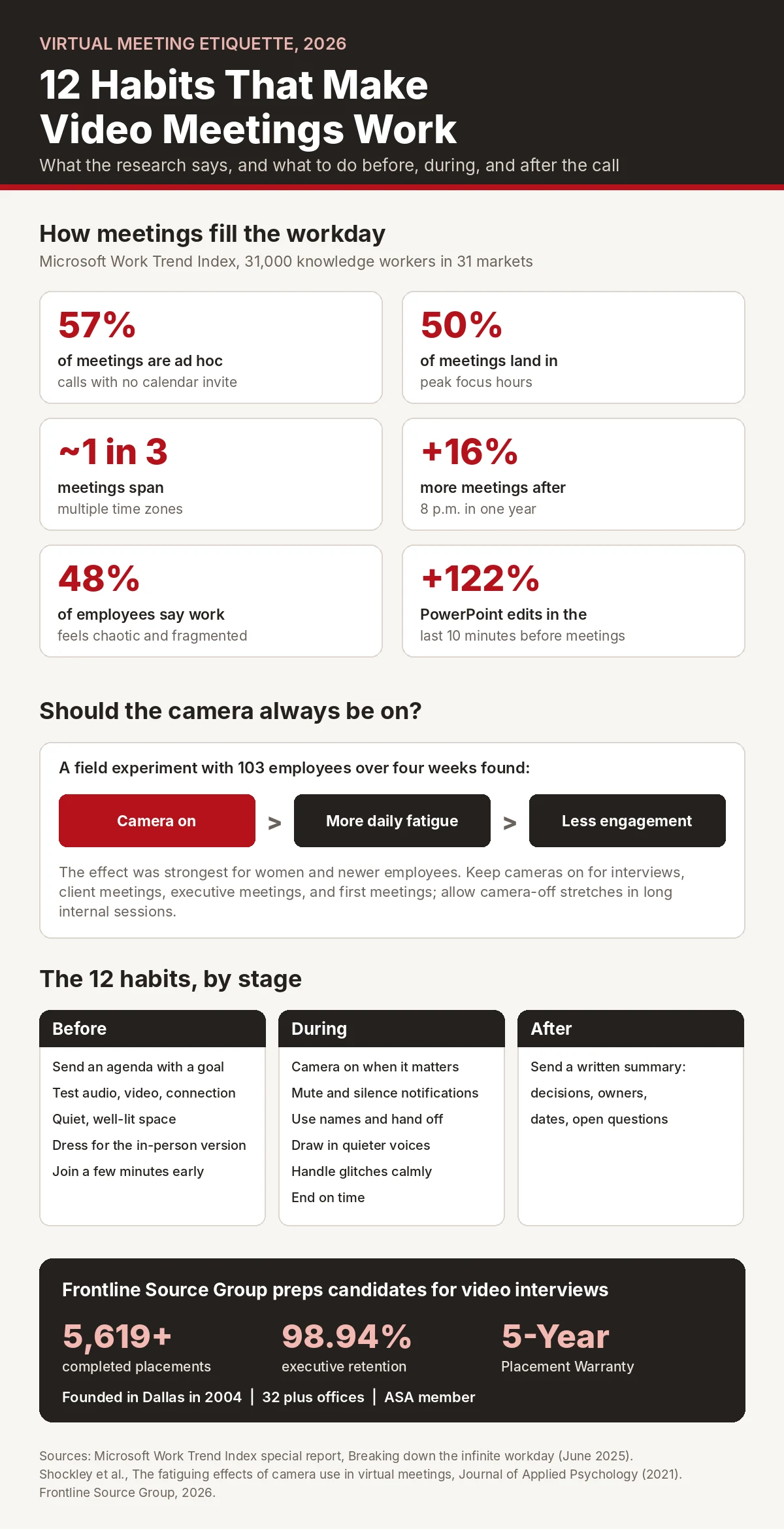
Microsoft's Work Trend Index found that 57 percent of meetings are ad hoc calls with no calendar invite, and half of all meetings land in the hours most people do their best focused work. Preparation tends to happen at the last second. Microsoft saw PowerPoint edits jump 122 percent in the final 10 minutes before meetings. Nearly half of employees say their work feels chaotic and fragmented. Good etiquette is one of the few things that pushes back against all of that.
Meetings that are ad hoc calls with no calendar invite
Meetings held during peak focus hours (9 to 11 a.m. and 1 to 3 p.m.)
Employees who say their work feels chaotic and fragmented
Meetings that span multiple time zones
What are the 12 best practices for virtual meeting etiquette?
Here is the full checklist. The sections below go deeper on each stage.
| When | Best practice | Why it matters |
|---|---|---|
| Before | 1. Send an agenda with a stated goal | Most meetings now happen with no invite at all, so a written goal sets you apart |
| Before | 2. Test audio, video, and your connection | Technical problems eat the first minutes and the first impression |
| Before | 3. Set up a quiet, well-lit space with the camera at eye level | People should focus on your message, not your surroundings |
| Before | 4. Dress for the equivalent in-person meeting | Executive, client, and interview meetings keep in-person standards |
| Before | 5. Join a few minutes early | Two to three minutes for internal calls, five for clients, ten for interviews |
| During | 6. Keep the camera on when it matters most | Interviews, clients, and executives expect it; routine internal calls can flex |
| During | 7. Mute when you are not speaking and silence notifications | Background noise and pings pull the whole group off track |
| During | 8. Speak clearly, use names, and hand off | Video loses the eye contact and body cues that direct a conversation in person |
| During | 9. Draw in quieter participants | Round-robins and reading the chat aloud keep a few voices from dominating |
| During | 10. Handle technical problems calmly | Switch to phone or chat, keep the meeting moving, and have a backup plan |
| During | 11. End on time | Running over teaches people that your meetings always run long |
| After | 12. Send a written summary of decisions, owners, and dates | The follow-up is where a meeting turns into action |
How do you prepare for a successful virtual meeting?
Strong meetings start before anyone joins. Share an agenda ahead of time with the goal, time per topic, and any pre-reads. Know which decisions the meeting needs to make and what information people need to make them. Test your audio, video, and connection a few minutes before start time. Have documents open and ready to share, and know where the mute, screen share, recording, and chat controls are so the meeting is not interrupted while you hunt for them.
How should you set up your space and technology for a virtual meeting?
Your setup is part of how you communicate. Pick the quietest spot you can. If noise is unavoidable, use a headset with a good microphone instead of the laptop's built-in mic. Put the camera at eye level and the light in front of you, not behind. Choose a neutral background or a clean virtual one. Make sure your internet connection is stable and keep a phone hotspot ready as a backup. The goal is for people to focus on what you are saying, not on troubleshooting your feed.
What does professionalism look like in appearance and behavior on video?
Dress for the meeting the way you would for the in-person version. Senior leadership, client, and interview meetings call for the same standards on video as in a conference room. Keep your expression engaged, because the camera tends to read a neutral face as a bored one. Keep your tone polite and professional, even after months of meetings with the same team. And close the other tabs, email, and chat apps. Multitasking shows, and it costs you what was said.
Should your camera be on in every virtual meeting?
Not necessarily. A four-week field experiment with 103 employees, published in the Journal of Applied Psychology found that keeping cameras on increased daily fatigue, which in turn lowered how much people spoke up and engaged in meetings. The effect was stronger for women and for newer employees. The practical answer is to treat camera use as a judgment call. Keep it on for interviews, client meetings, executive meetings, and first meetings with new people. For long internal sessions with a familiar team, camera-off stretches are reasonable, and leaders should say so out loud so nobody feels judged for it.
"We're not advocating for cameras off all the time."
Kristen Shockley, University of Georgia psychologist and lead author of the Journal of Applied Psychology camera study, then an associate professor in UGA's Franklin College of Arts and Sciences, speaking to UGA Today in September 2021
Shockley and her co-authors argue for giving people autonomy over video and being more deliberate about when it is on, which is the same judgment-call approach above.
What are the best communication practices in virtual meetings?
Clear communication closes the gap video creates. Speak at a measured pace and pause between thoughts so others can react and audio does not overlap. Use a person's name when you direct a question to them, since the eye contact and head turn that work in person do not carry over to a grid of faces. Show you are listening by nodding, using short affirmations, and restating what someone said before you respond. Use the raise-hand feature or natural pauses instead of interrupting, and end your turn with a clear hand-off so people know you are done.
How do you manage distractions and stay engaged during virtual meetings?
Distraction is the most common way virtual meetings fail. Silence phone, email, and chat notifications for the length of the meeting. Take notes by hand or in one dedicated document rather than switching between apps. Keep food, side tasks, and a second screen full of email out of the frame. If you need to step away, say so briefly in the chat instead of vanishing.
How do you make virtual meetings inclusive and encourage participation?
Video tends to amplify the loudest voices. Use a round-robin for any segment where you are gathering opinions, so everyone speaks at least once. Watch the chat and bring good points into the conversation out loud, since people who only type often get overlooked. Credit contributions by name and by substance so quieter participants feel heard. And be deliberate about who is invited; meetings packed with passive observers end up run by a few people.
How do you run a virtual meeting across time zones?
Microsoft found that nearly a third of meetings now span multiple time zones, and meetings after 8 p.m. rose 16 percent in a year. Rotate recurring meeting times so the same people are not always taking the early or late slot, record sessions for anyone who cannot attend live, and put decisions in writing so nobody has to be on the call to know what happened.

How should you handle technical issues during a virtual meeting?
Technical problems will happen. The professional response is calm, not frantic. If your audio fails, switch to phone dial-in or the chat while you fix it. If video drops, stay on audio rather than leaving. For executive and client meetings, agree on a backup in advance: a second platform, a phone bridge, or a time to reschedule. Let the host know in the chat before you reconnect so nobody is left guessing, and then move on. A glitch handled well rarely changes how a meeting turns out.
What is the right way to follow up after a virtual meeting?
The follow-up is where a meeting turns into results. Within a day, send a short written summary. Keep it brief; people will read a short recap and skip a long transcript. Save it somewhere shared so people who join later can catch up, and after high-stakes meetings, ask for feedback to improve the next one.
What should a meeting summary include?
Four things: the decisions made, the action items with an owner and a due date for each, any open questions set aside for later, and the next meeting time if there is one. After a job interview, the follow-up is a thank-you note instead. Here is guidance on writing one: frontlinesourcegroup.com/blog-thank-you-note-after-interview-email-subject.html.
How does Frontline Source Group help candidates and executives prepare for high-stakes virtual meetings?
Frontline recruiters prepare the candidates they represent for video interviews and panel meetings with company background, context on the role and hiring manager, and practical guidance for the platform the client uses, whether that is Zoom, Microsoft Teams, Google Meet, or Webex. Our interview preparation guide is at frontlinesourcegroup.com/interview-instructions.html, and more candidate resources are at frontlinesourcegroup.com/candidates.html.
What do employers get when running virtual searches with Frontline?
Employers running virtual executive searches and panel interviews get candidates who arrive prepared, and every direct hire is backed by the 5-Year Placement Warranty, 20 times the 90-day industry standard guarantee. Program terms are at frontlinesourcegroup.com/5year-placement-guarantee.html, and engagement pricing is published at frontlinesourcegroup.com/pricing.html. You can start a search at frontlinesourcegroup.com/employer-request-form.html. Job seekers can apply at frontlinesourcegroup.com/how-to-apply.html.
Frequently Asked Questions: Virtual Meeting Etiquette
What are the most important virtual meeting etiquette rules?
Share an agenda, test your technology, set up a quiet and well-lit space, dress for the equivalent in-person meeting, keep your camera on when it matters, mute when you are not speaking, speak clearly and use names, include quieter participants, handle glitches calmly, end on time, and send a written summary afterward.
How common are unscheduled virtual meetings?
Very common. Microsoft's Work Trend Index found that 57 percent of meetings are ad hoc calls with no calendar invite, and half of all meetings fall in peak focus hours of 9 to 11 a.m. and 1 to 3 p.m. A short agenda with a stated goal makes your meetings stand out.
Should you keep your camera on during virtual meetings?
Keep it on for interviews, client meetings, executive meetings, and first meetings. A field experiment in the Journal of Applied Psychology found constant camera use increased fatigue and reduced engagement, especially for women and newer employees, so camera-off stretches in long internal meetings are reasonable.
What should I do if I'm late to a virtual meeting?
Let the host know by chat or text as soon as you can. Join on mute, listen for a moment to catch up, then turn your camera on at a natural pause. Keep any apology brief; a long apology draws more attention than the lateness.
How can I handle background noise during meetings?
Use a headset with a good microphone instead of the laptop's speakers and mic, mute when you are not speaking, and choose the quietest spot available. If noise is unavoidable that day, mention it briefly at the start instead of letting it surprise people mid-discussion.
How early should you join a virtual meeting?
Join two to three minutes early for internal meetings, five minutes early for client meetings, and ten minutes early for interviews and high-stakes presentations. That window lets you confirm audio and video and start calmly instead of rushed.
How should you dress for a virtual meeting?
Dress as you would for the in-person version of the same meeting. Interviews and client presentations call for the same standards as in a conference room, while internal meetings can follow the team's usual dress code. Solid colors and muted patterns look better on camera than busy prints.
What is the best way to share documents in a virtual meeting?
Send documents with the invite when possible so people can review ahead of time. During the meeting, use screen share so everyone sees the same view, have the document open to the right page before you share, stop sharing when you are done, and drop a link in the chat for reference.
How do you handle technical problems mid-meeting?
Stay calm and switch channels. If audio fails, use phone dial-in or chat. If video fails, continue on audio. For important meetings, agree on a backup platform, phone bridge, or reschedule time in advance, and tell the host in the chat before you reconnect.
How do you keep a virtual meeting on time and focused?
Send an agenda with time for each topic, open by restating the goal and end time, and watch the clock for each section. If a topic runs long, name the trade-off and let the group decide what to defer. End on time and schedule a follow-up rather than running over.
What should a follow-up after a virtual meeting include?
Send a short written summary within a day with the decisions made, action items with an owner and due date, open questions set aside for later, and the next meeting time. After a job interview, send a thank-you note instead.
How does Frontline Source Group prepare candidates for virtual interviews?
Frontline recruiters give the candidates they represent company background, context on the role and hiring manager, and practical guidance for the platform the client uses. Interview preparation tips are at frontlinesourcegroup.com/interview-instructions.html, and candidates can apply at frontlinesourcegroup.com/how-to-apply.html.


